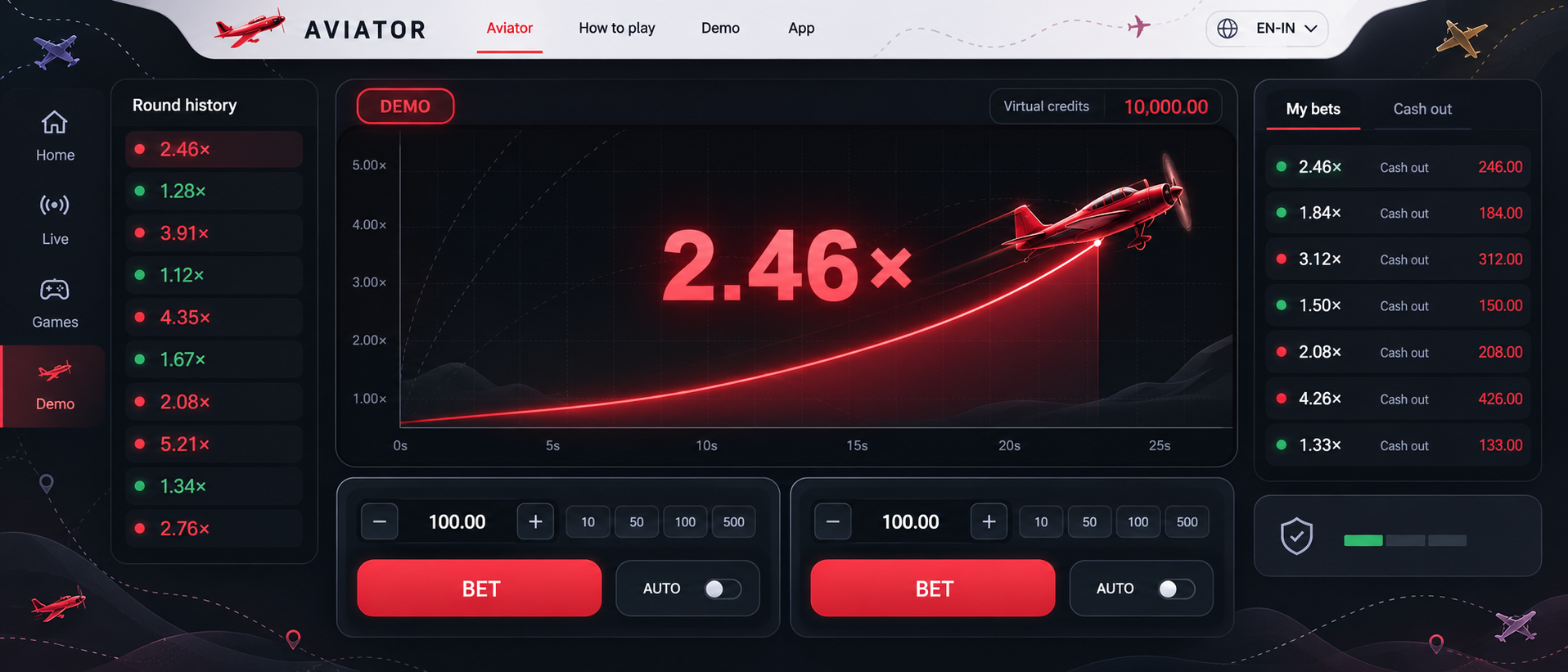
One flight. A rising multiplier. Your cash-out decision. Understand each round, explore demo mode and learn how manual and auto cash out work—before choosing how to play.
Aviator is a multiplayer crash game by SPRIBE, built around a rising multiplier and one clear decision: when to cash out.
Each round begins at 1.00x. The red plane climbs as the multiplier increases, while every player chooses whether to collect the displayed value before the flight ends. The plane is a visual timer—not a clue to the next result—so a round is easy to follow without pretending its endpoint can be predicted.
One shared flight connects three clear moments: placing the stake before take-off, watching the multiplier rise and settling the bet before the round ends.
Before take-off
Set the stake while the next Aviator round is open. A new entry cannot join the flight after take-off.
Multiplier in flight
The multiplier starts at 1.00x and rises in real time while the plane remains visible on screen.
Cash out or round end
A successful cash out settles at the accepted multiplier. If the flight ends first, the active bet receives no payout.
The displayed flight path explains the timing of a round; it does not reveal the next crash point.
How to Play Aviator: A Round Explained
Understand the round before you use the controls. Follow the betting window, the rising multiplier and the recorded result—step by step.Account registration, deposits and withdrawals belong to the platform hosting the game.
01
Before take-off
Check the game and its limits
Open the in-game rules before using the controls. Confirm the developer, displayed currency, minimum and maximum stake, and any payout limits. For an Indian audience, a rupee example is convenient, but the currency on your actual screen is what matters. Use demo mode, where available, to become familiar with the interface first.
02
While betting is open
Set a stake before the flight
Enter the amount in a bet panel while betting is open, then submit it. A typed amount alone does not mean a bet has been accepted: check the panel’s confirmed state. If you use both panels, review the combined stake. A missed betting window means waiting for another round; do not assume a late action joined the current one.
03
During the flight
Follow the multiplier and cash out
During an active flight, the multiplier rises. Manual Cash Out requests settlement at the multiplier accepted by the game; Auto Cash Out uses a target configured beforehand. Your visible animation and an accepted settlement are different things. Check the recorded result, especially if the connection is delayed or the button responds slowly.
04
After the round
Read the completed result
A successful cash out returns the stake multiplied by the confirmed cash-out multiplier. If the plane leaves before settlement, the active stake is lost. Review your own bet record rather than copying another player’s result from the live feed. The next round starts a new decision; a previous outcome does not tell you when it will end.
Understanding Your Payout
Stake×Accepted multiplier=Total return
With an illustrative ₹100 stake settled at 2.50×, the total return is ₹250. This includes the original ₹100 stake, so the net profit is ₹150—not ₹250.
The calculator separates those two amounts. It assumes a successful cash out and does not include platform-specific rounding, deductions or payout caps. If the round ends before your cash out, the return for that active bet is ₹0 and the net result is −₹100 in this example.
Illustrative payout calculator INR
Total return
₹250.00
Net profit
₹150.00
Arithmetic illustration only. No bets are placed; these inputs are not the game’s permitted limits.
Cash out is an in-game action. It closes an active bet. Moving an account balance to a bank or payment service is a separate withdrawal process.
Cash Out, Auto Cash Outand Other Controls
For experienced players, the important distinction is between what a control requests, what the game accepts, and what the completed record confirms.
Request
Acceptance
Record
Different controls. Different jobs.
Illustrations only — no bets are placed
Manual Cash Out vs Auto Cash Out
Manual Cash Out
Request during the flight
Auto Cash Out
Target set beforehand
Manual Cash Out is an action you request while your bet is active. Auto Cash Out uses a multiplier you set before the flight. The target must be reached while the bet can still be settled; setting a target does not guarantee that the round will get there.
For either method, read the accepted cash-out record. Do not treat the last number you saw on the animation as proof of settlement. Auto Cash Out reduces dependence on a well-timed click, but it does not change the round’s outcome.
Auto Bet vs Auto Cash Out
Auto Bet
Repeats placement
Auto Cash Out
Targets settlement
These controls solve different tasks. Auto Bet repeats bet placement for subsequent rounds according to its configuration. Auto Cash Out concerns settlement of an active bet at a selected target. Enabling one does not tell you that the other is configured.
Auto Bet
Review stake, round count and any available stopping conditions before enabling it.
Auto Cash Out
Review the target in each active panel; a target is not a forecast.
Two Bet Panels in One Round
Panel A · ₹50 stake₹75 returnAccepted at 1.50×
Panel B · ₹50 stake₹0 returnLost before settlement
Combined net result−₹25
The two panels let you use separate stakes and cash-out settings during the same flight. They are separate bets, but they share the same crash point. One accepted cash out does not automatically close the other position.
For example, two illustrative ₹50 bets create ₹100 of total exposure. If one settles at 1.50×, its return is ₹75. If the other is lost, the combined result is ₹75 − ₹100 = −₹25. A successful cash out in one panel can still leave the round with a net loss.
Round History and Your Bet Record
Round history
The completed flight’s coefficient
Your bet record
Your accepted settlement and return
The history strip reports completed round multipliers. Your bet record reports what happened to your own stake. A high coefficient in round history does not mean you received that multiplier; your cash-out record determines your return.
Live bets, chat and recent results can help you understand the interface, but they do not reveal the next crash point. When reviewing a connection issue, record the round identifier and settlement shown by the game instead of relying only on the moving aircraft.
What Result Verification Can Tell You
CommitmentRevealed dataVerify
SPRIBE describes Aviator as using provably fair technology. This concerns checking a completed result against the cryptographic information made available for it. It is a way to examine a past round, not a tool for finding the next multiplier.
For a practical check, use the fairness information and instructions exposed in the game you are actually viewing. Field names and access paths may vary; no universal menu sequence or verifier is assumed here.
01Select the completed round. Keep its identifier and displayed coefficient so you can compare the same record.
02Open its fairness information. Inspect the commitment, revealed data and explanation provided by that implementation.
03Follow the supplied verification method. Compare its output with the recorded result. A copied hash by itself is not a verification.
04Check the rule sheet as well. Stake limits, settlement rules and platform support remain separate questions.
RTP describes a theoretical long-run return. SPRIBE’s product page lists 97% for Aviator; this is not a promise about one round or session. Confirm the figure and limits in the version you open. Neither automation nor a cash-out target guarantees profit.
05Choose the access method, not just the name
Aviator Demo, Browser Play and App Options
Demo mode is useful for learning the controls without treating the displayed balance as money you can withdraw. Where it is offered, use the virtual-credit environment to follow a round, practise reading the two panels and observe how cash-out settings behave.
Check what the demo actually includes: balance type, enabled controls and any practice limits. Its results do not predict a later session. This page provides an educational guide and illustrations; it does not host a playable demo.
Concept interfaceDemo, browser and app access can differ by platform.
Browser Play vs an App
The game identity and the platform hosting it are separate checks.
Browser play
A compatible browser can open the game through a platform that hosts it. This avoids installing a separate application just to view that version. Check the developer inside the game, and use the platform’s genuine address rather than a copied advertisement.
Installation
No separate app for browser access
Updates
Handled by the hosted version
Android app
An operator app may include Aviator among other games. Its publisher, account features and update process belong to that operator. A title containing “Aviator” does not establish that SPRIBE published the app or that it contains the original game.
Installation
Store app or a verified APK source
Updates
Follow the publisher’s process
iPhone & iPad
An Android APK cannot be installed as an iOS application. Browser access or an iOS app depends on the actual platform and device support. Check compatibility directly; a download badge on a guide is not evidence that a matching iOS app exists.
Installation
Compatible iOS app, if offered
Alternative
Supported mobile browser
Understanding APK Downloads
An APK is an Android installation package. Before using an “Aviator APK download”, establish who publishes it and what it contains. The file format identifies how software is installed; it does not prove game identity or publisher authenticity.
PublisherMatch the developer and download domain to the platform’s own information.
File detailsInspect the stated version, device requirements and update route; do not infer them from a filename.
PermissionsReview the permissions requested during installation and the publisher’s explanation for them.
Game identityAfter opening it, verify the SPRIBE identity in the game information and read the displayed rules.
For a clearer mobile experience: use a supported, updated browser or app; check the confirmed bet and cash-out records after a connection interruption. If a control is obscured, adjust the view before using it—do not rely on a partially visible button.
06The short answers
Aviator Game FAQs
Clear answers to the questions that matter—from reading a payout to understanding automation, demo credits and game identity.
Independent explanations. Check the rules of the version you open.
01
What is Aviator by SPRIBE?
Game identity
Aviator is SPRIBE’s multiplayer crash game. A multiplier rises during the flight; you bet before take-off and cash out before the round ends to receive the accepted return. The red plane visualises the round—it is not an aircraft you control.
02
How does the multiplier affect my payout?
Payout
Total return is your stake multiplied by the accepted cash-out multiplier. An illustrative ₹100 bet settled at 2.50× returns ₹250, including the original stake: net profit is ₹150. Check any platform-specific rounding, deductions or payout limits separately.
03
How is Auto Cash Out different from Auto Bet?
Controls
Auto Cash Out uses a selected multiplier to settle an active bet if that target is reached in time. Auto Bet repeats bet placement according to its settings. Review each configuration separately; enabling one does not configure the other.
04
Can I use two bet panels in the same round?
Two panels
Yes. Each panel has its own stake and cash-out settings, but both face the same round ending. One accepted cash out does not close the other bet. Compare the combined return with the combined stake to understand the net result.
05
Does round history predict the next result?
Round history
No. History reports completed multipliers, not future crash points. A run of low or high results does not establish the next outcome. Your own cash-out record is also different from a high multiplier displayed in the history strip.
06
What can I learn in Aviator demo mode?
Demo mode
Where available, a demo lets you practise following a round, reading bet panels and configuring cash-out controls using virtual credits. Check its included features. The displayed balance is not withdrawable money, and practice results do not predict later outcomes.
07
Do I need an app to access the game?
Device access
Not necessarily. A platform may support browser play, an app, or both. Check its actual device compatibility. An Android APK is not an iPhone app. This independent guide explains access options; it does not host a playable game or demo.
08
Are all apps named Aviator the same game?
App identity
No. Unrelated apps can share the name. Check the SPRIBE identity and rules inside the game. Verify the app publisher and genuine download source separately: a familiar icon or title alone does not establish which product you are installing.
09
What does provably fair verification establish?
Verification
It checks a completed result against the cryptographic information provided for that round. Follow the version’s supplied method and compare the output with the recorded result. Verification explains a past outcome; it does not reveal the next multiplier.
10
What does Aviator’s RTP figure mean?
RTP
SPRIBE lists 97% RTP. This describes a theoretical return over extensive play, not a guaranteed refund from a deposit or session. Check the stated figure in your version; individual outcomes can differ substantially from that long-run percentage.
These answers explain the game and its controls. Platform-specific access, payments, limits and support must be checked with the service you use.